EosLog Review (2026): We Tested the Free Plan From Quote to Paid Invoice
EosLog is a new, low-cost field service app for small crews, covering quotes, scheduling, invoicing and payments, with job costing that shows profit and margin per job.
By Javier · Trade Software Reviews
EosLog is a new, low-cost field service app that is easy to learn and surprisingly capable on the free plan, including per-job profit and margin. It is built cleaning-first, so plumbers and HVAC techs will need to edit its default text and terms. A strong budget pick for small crews; larger teams should look at Jobber or Housecall Pro.
Disclosure: We may earn a commission when you sign up through links on this page, at no extra cost to you. This never affects our ratings. Learn more.
Pros & cons
Pros
- Free plan with no card required
- Per-job profit and margin, even on Free
- Invoice is created automatically when a job is completed
- Quick to learn; English and Spanish
Cons
- Cleaning-first defaults need editing for trades
- Reports, time tracking and forms locked on Free
- QuickBooks sync only on the $149 Shop plan
- New product with few public reviews
EosLog pricing
Plans below reflect publicly listed pricing, verified October 19, 2026. Vendors adjust prices periodically, so confirm at checkout.
Free
1 user, up to 20 clients. 15 jobs, 15 invoices and 20 quotes per month. No card required
- Online payments
- Quotes and invoices
- Scheduling
Solo
1 user, 100 clients. $31/mo billed yearly. Extra users $15/mo
- Recurring jobs
- Time tracking
- E-signatures
- Mobile app
Crew
3 users, 500 clients. $63/mo billed yearly. Extra users $15/mo
- Client portal
- Forms and checklists
- Reports
- SMS (100 segments/mo)
Shop
10 users, unlimited clients. $119/mo billed yearly. Extra users $12/mo
- QuickBooks sync
- Workflow automation
- Roles and permissions
- SMS (500 segments/mo)
Feature-by-feature breakdown
Inside EosLog
How we tested EosLog
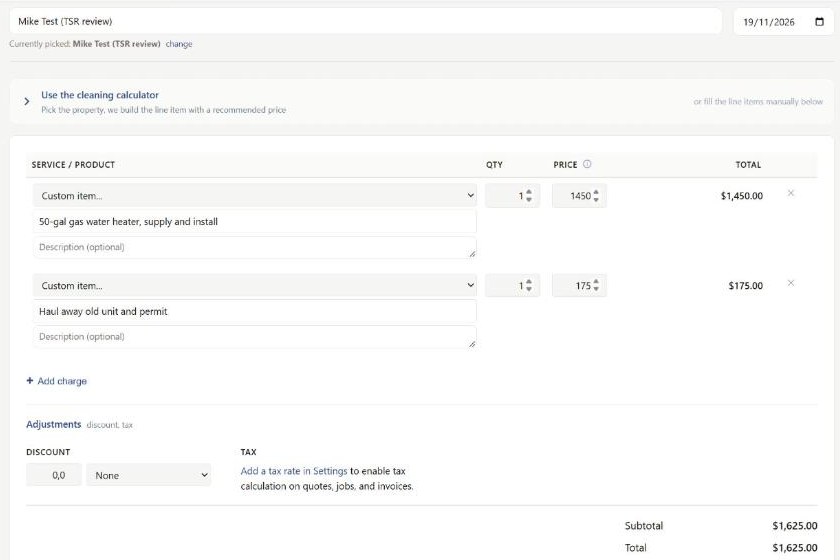
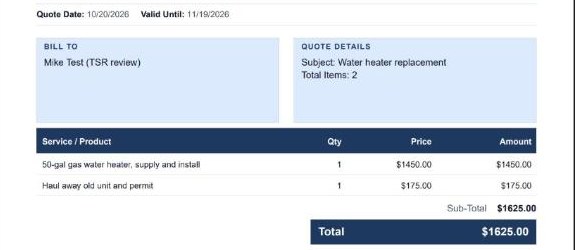
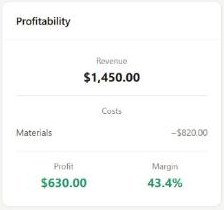
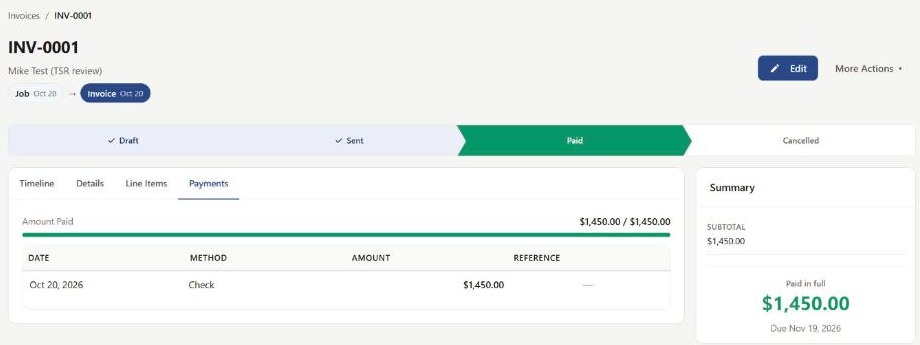
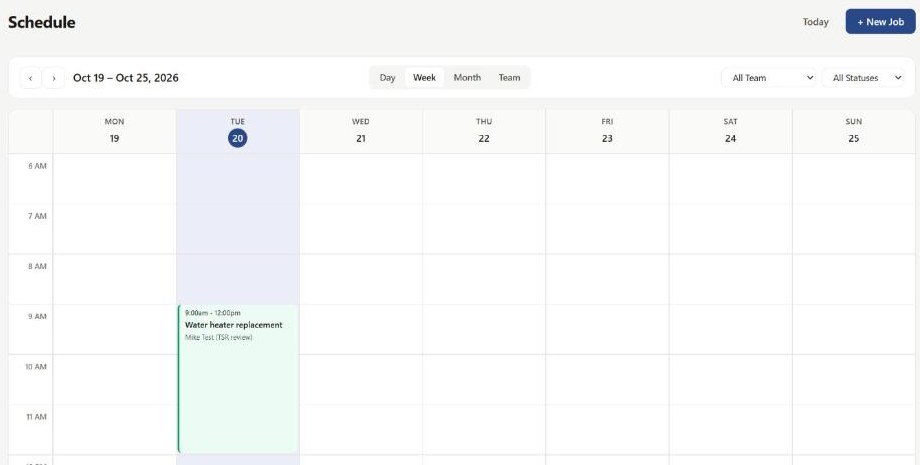
We signed up for the free plan on October 19, 2026 and ran one complete job through it, the way a small plumbing shop would. We created a client, built a quote for a 50-gallon gas water heater replacement ($1,450) plus haul-away and permit ($175), scheduled the job for a three-hour slot, entered an $820 material cost, marked the job complete, and recorded a check payment against the invoice. The test client had no email address, so nothing was sent to a real customer. The whole loop took about four minutes of clicking, without opening the help docs. Prices come from EosLog's own pricing page, checked the same day.
What stood out
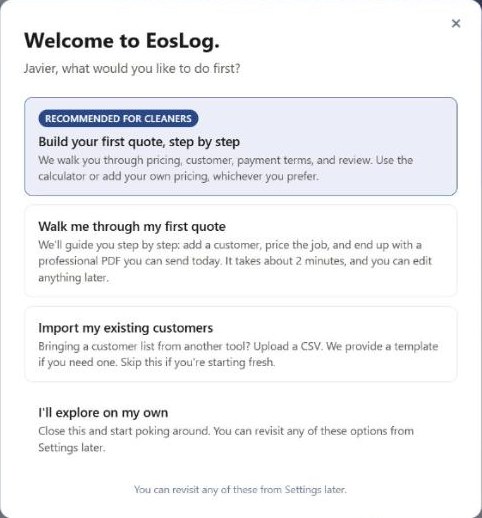
It is quick to learn. A first quote needs only a customer name. Phone, email and address can wait. Every screen tells you the next step, and the job page shows a simple stage bar (Unscheduled, Scheduled, In Progress, Completed).
Job costing on the free plan. Most budget tools stop at quotes and invoices. EosLog lets you enter what each line item costs you and shows profit and margin on the job. For a small shop trying to see which jobs actually make money, this is the most useful thing in the app.
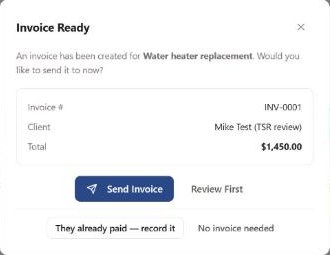
Invoices create themselves. When we marked the job complete, the invoice was already drafted, with a 30-day due date. Recording a payment by check was one click.
Where it falls short
It is built for cleaning first. Our account was set up as a cleaning business, and it showed: a cleaning price calculator on the quote screen, default terms that mention "each visit," and a business tagline on the PDF that read "Residential and Commercial Cleaning Services." All of it is editable, but a plumber or HVAC tech has to change it before sending the first quote.
Quote and job are separate until the customer approves. The job we created by hand was not linked to our draft quote. EosLog converts a quote into a job in one click once the customer approves it online. We did not test that step because we did not send the quote to a real customer.
Locked features on lower plans. Reports, time tracking and field forms are locked on the free plan, SMS starts on Crew, and QuickBooks sync and automation need Shop.
It is new. EosLog is a young product with few public reviews so far. That is not a flaw in itself, but it is worth weighing if you plan to run a larger team on it.
Who should use EosLog
Solo operators and crews of one to three people who want to stop quoting from a notes app and start seeing profit per job, without paying $50 to $100 a month on day one. Cleaning, handyman and lawn care businesses get the most out of the defaults. Small plumbing and HVAC shops can use it too, after a few minutes of setup.
Who should look elsewhere
Teams that need mature dispatching, a large integration list, or a long track record should compare Jobber and Housecall Pro. If you are a solo pro who mostly needs fast quotes and invoices, QuoteIQ is the other budget option to compare.
Frequently asked questions
Is EosLog free?
How much does EosLog cost?
Is EosLog good for plumbing or HVAC?
Does EosLog track job profit?
Does EosLog integrate with QuickBooks?
Ready to try EosLog?
Free • Solo operators and crews of 1 to 3 who want a free or cheap start
Alternatives to consider
Related comparisons
Get the contractor software cheat-sheet
No-fluff comparisons and pricing updates. Unsubscribe anytime.